Thursday, 20 March 2014

Nokia X+
Nokia X+ and XL to ship with bundled 4GB microSD card
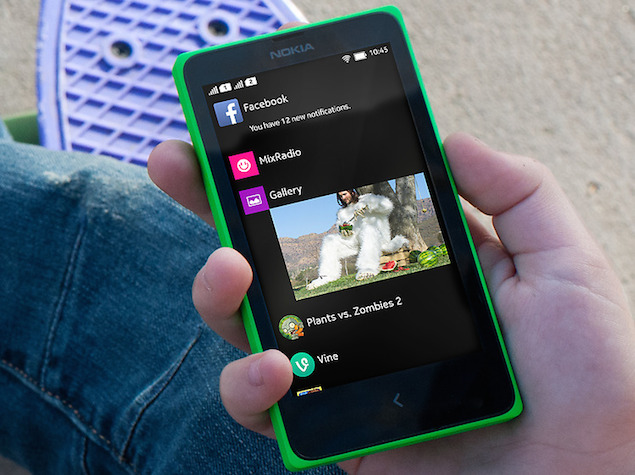
Nokia has revealed the inclusion of 4GB microSD cards for two of its recently announced Nokia X series smartphones, the Nokia X+ and Nokia XL.
The news comes from thr Nokia Conversation blog, where a Nokia fan, @Juan Martinez, asked "What storage do the phones come with?" to which the firm replied "All devices in the Nokia X family can support up to 32GB microSD cards. The Nokia X+ and Nokia XL come with a 4GB card included."
While this doesn't eliminate the user worry of low inbuilt storage (the three Nokia X series phones feature 4GB of inbuilt storage), the inclusion of a bundled microSD card for two models should help placate users slightly.
Google unveils Android Wear project; LG, Motorola to make first smartwatches
Google unveils Android Wear project; LG, Motorola to make first smartwatches

Voice-controlled smartwatches that track heart rates and connect to phones and tablets will debut later this year as Google Inc partners with electronics, technology and fashion companies to take consumers to the next promised frontier in computing.
Google on Tuesday unveiled plans to help develop the watches and other wearable computers based on its Android mobile operating system, which already runs more than three out of four smartphones sold worldwide.
Flappy Bird will fly again
Flappy Bird will fly again, but it's going to take a while

After a meteoric rise in popularity, the casual game Flappy Bird was taken down from the iTunes and Google Play app stores by its developer Dong Nguyen. In a tweet on Wednesday, Nguyen confirmed that the app will be back to the stores, but added, "but not soon".
After a meteoric rise in popularity, the casual game Flappy Bird was taken down from the iTunes and Google Play app stores by its developer Dong Nguyen. In a tweet on Wednesday, Nguyen confirmed that the app will be back to the stores, but added, "but not soon".
Samsung Galaxy S3
Samsung Galaxy S3 Slim with quad-core CPU listed on company's site
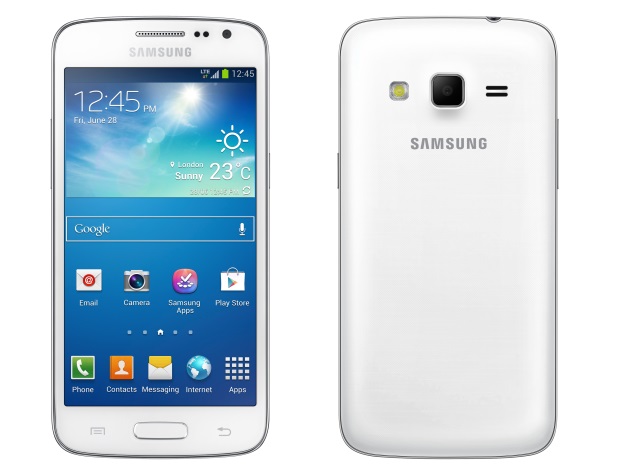
Samsung has quietly listed its latest Galaxy S3 Slim smartphone on its Brazil site without pricing and availability details.
As of now, there is no word whether the Samsung Galaxy S3 Slim will be available in other countries or not.
The Samsung Galaxy S3 Slim seems to be a 'lite' variant of the company's 2012 flagship smartphone, the Galaxy S III. However, it's worth pointing out that the specifications of the Galaxy S3 Slim are much more basic than the former flagship.
Google Search quick voice commands app for Android gets,camera
Google Search quick voice commands app for Android gets,camera
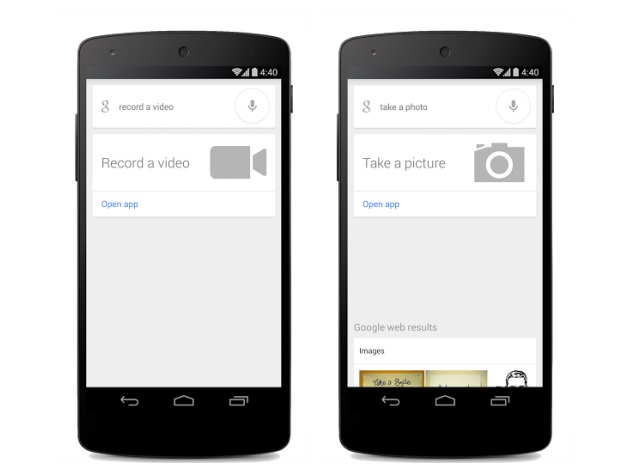
Google is rolling out an update for its Google Search app for Android, adding voice commands for actions like clicking images or taking videos. These commands can be activated by saying 'Ok Google'.
Google is rolling out an update for its Google Search app for Android, adding voice commands for actions like clicking images or taking videos. These commands can be activated by saying 'Ok Google'.
With the latest update, Android device users will need to tap the microphone icon on the Search app, or say 'Ok Google' on the home screen, and then, be able to launch the default camera app with voice commands like 'take a picture' for launching the camera app in camera mode, and 'record a video' for opening the app in video mode. The interesting bit is that users now don't need to touch the phone for launching the camera app.
Google announced the new update on its Google+ page and said, "Now with the Google Search App on Android, you can just tap the microphone or say "Ok Google," then "take a photo" or "take a video." Google will launch your camera app in the preferred mode."
Notably, the Google Search update has not reached Play Store India yet and the listing is showing 14 March 2014 as the last update for the app.
Skype update for Android app brings battery savings
Skype update for Android app brings battery savings 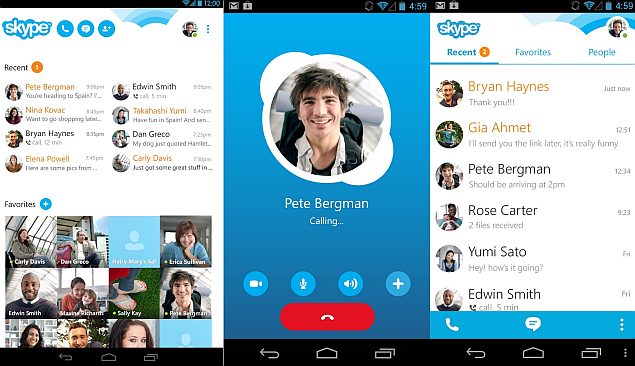
According to Skype, the new Skype app for Android (version 4.7) will loosen its grip on the device's battery life.
"With Skype 4.7 for Android, we are introducing aggressive battery savings that will allow most of our users to leave Skype running without noticeably affecting battery life," states the Skype blog.
In order to let Skype users on Android achieve "amazing battery savings" on their device, the update turns off the group message notification as the feature drains a considerable amount of battery. This however, is a temporary process as the Skype team has promised that, "In the near future, you will be able to receive group chat messages instantly without additional battery impact."
Friday, 14 March 2014
How to create a restricted user profile on your Android device
How to create a restricted user profile on your Android device
There are several reasons why you might be interested in creating a
second, limited profile on your Android device. For example, if the
device is being used by your employees who need to perform a specific
task, a restricted profile will block them from gaining access to apps,
games or any private content. In another scenario, you could be a
teacher who lends their tablet to students or have a child at home that
likes to play games. Today we will tell you how to set up a restricted
profile.

2. Tap the Add user or profile
3. Select the restricted profile.

5. If you don’t have a lock screen set up to protect your own profile, it will prompt you to create one with a pattern or pin.

6. The new profile is complete. Now you can access either one from the lock screen.

This is a simple and easy way to maintain the confidentiality of your data. Alternately you can set up second user profiles that aren't restricted by going the same route but not choosing the restricted option.
Thursday, 13 March 2014
YouTube app for Android updated with improved search and UI, bug fixes
YouTube app for Android updated with improved search and UI, bug fixes

Google on Wednesday updated its YouTube app for Android users. The updated app with Version 5.5.27 is now available for all smartphones running Android Version 2.3.3 and above.
Google on Wednesday updated its YouTube app for Android users. The updated app with Version 5.5.27 is now available for all smartphones running Android Version 2.3.3 and above.
The latest version of the YouTube app (available on the Google Play store) integrates few new features to it. It now allows user to find videos, playlists and channels together in search results. Additionally there are now tabs on channel pages for Activity, Videos and Playlists.
Wednesday, 12 March 2014
McAfee Antivirus and Security app for Android and iOS is now free
McAfee Antivirus and Security app for Android and iOS is now free
McAfee, the Intel-owned IT security company, has announced that its McAfee Antivirus & Security app (known as McAfee Security app on iOS) will be free on Android and iOS platforms.
McAfee, the Intel-owned IT security company, has announced that its McAfee Antivirus & Security app (known as McAfee Security app on iOS) will be free on Android and iOS platforms.
Google planning 'performance boosting thing' for next Android version
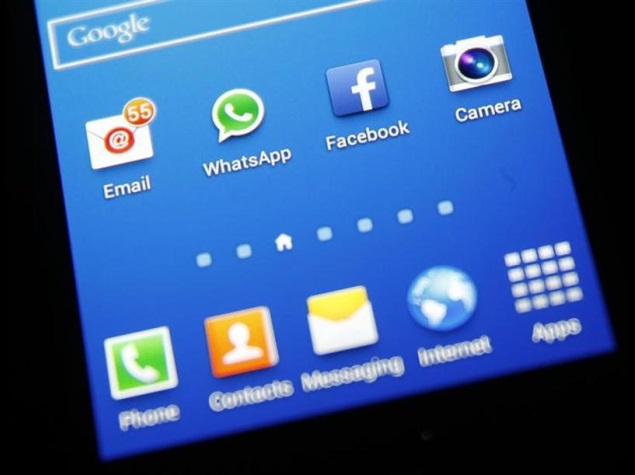
Google, on the Android Open Source Project forum, has marked 'performance boosting thing' for a future release.
Android users who get upset by the slow performance of their devices might be relieved once the next iteration of the operating system releases, as it is to bring a 'performance boosting thing'.
One of the forum members of the Mountain View giant's Android Open Source Project (AOSP) forum, named Amit, raised an issue about the slow performance of Android devices (smartphone and tablets). Notably, the forum member suggested Google to introduce a 'performance boosting thing' in the next version of Android.
Google Apps Referral programme kicks off at $15 per user
Google Apps Referral programme kicks off at $15 per user
Search-engine giant Google is aiming to use word-of-mouth to increase the usage of its Google Apps for Business. Existing users can now refer their friends, colleagues or co-workers to start using Google Apps for Business. For any referred user who signs up for it, the existing user receives a referral cash bonus of $15 (roughly Rs. 910).
Search-engine giant Google is aiming to use word-of-mouth to increase the usage of its Google Apps for Business. Existing users can now refer their friends, colleagues or co-workers to start using Google Apps for Business. For any referred user who signs up for it, the existing user receives a referral cash bonus of $15 (roughly Rs. 910).
Tuesday, 11 March 2014
uTorrent app for Android updated with new features and redesigned interface
uTorrent app for Android updated with new features and redesigned interface
BitTorrent on Monday updated its popular torrent client app for Android - uTorrent. The latest updatebrings to uTorrent to version 2.03, which comes with new features alongside a refreshed design.
BitTorrent on Monday updated its popular torrent client app for Android - uTorrent. The latest updatebrings to uTorrent to version 2.03, which comes with new features alongside a refreshed design.
Monday, 10 March 2014
How to transfer files from your Android to PC via WiFi (without Gapps)
How to transfer files from your Android to PC via WiFi (without Gapps)
If you don’t like the Gapps and prefer not to share the contents of your device with Google+,Google Drive or Gmail, there are several alternative ways of transferring all the contents of your Android on a PC using Wi-Fi.

A very simple and quick way to transfer all your files to the PC is by using an application that allows you to synchronize your data with a just a few clicks.
Here's the step-by-step :
1. Download the WebSharing app from the Google Play Store.
2. Once installed, it will show an IP address, such as http://192.168.etc, which consists of a code of 5 characters password.
3. On your PC, open a tab on your browser and copy the same IP address into the top bar. In the window that then appears, enter the password that appeared on your smartphone

4. Click "Continue ".
5. At this point a window will open with several folders. This consists of the same data in the internal memory of your device.
6. After that, you can now view and save all the folders onto the computer’s memory. If you want to save a photo, for example, just click the right button of your mouse over top of it and select "Download selected elements ". The photo will then be saved onto your PC.
On the top bar of the WebSharing, you can get information on the status of the device, like battery, used internal storage space, Wi-Fi signal and the current processor usage.
WebSharing is available for free on Google Play Store.
Saturday, 8 March 2014
Nexus 7
Nexus 7
Now thinner, lighter, and faster — Nexus 7 brings you the perfect mix of power and portability and features the world’s sharpest 7” tablet screen putting over 2.3 million pixels in the palm of your hand.
With 323 pixels packed into every inch, you can read text that’s sharper than the printed page, see images more vivid than the highest quality photo magazine, and watch videos come to life in vibrant 1080p HD.
With 323 pixels packed into every inch, you can read text that’s sharper than the printed page, see images more vivid than the highest quality photo magazine, and watch videos come to life in vibrant 1080p HD.
Subscribe to:
Posts (Atom)